
Reach every contact at scale.
Launch reminder, follow-up, and collection campaigns that run consistent, polite, fully-logged calls to the contact lists you choose.
- No signup needed
- 5 free calls
- 130+ languages
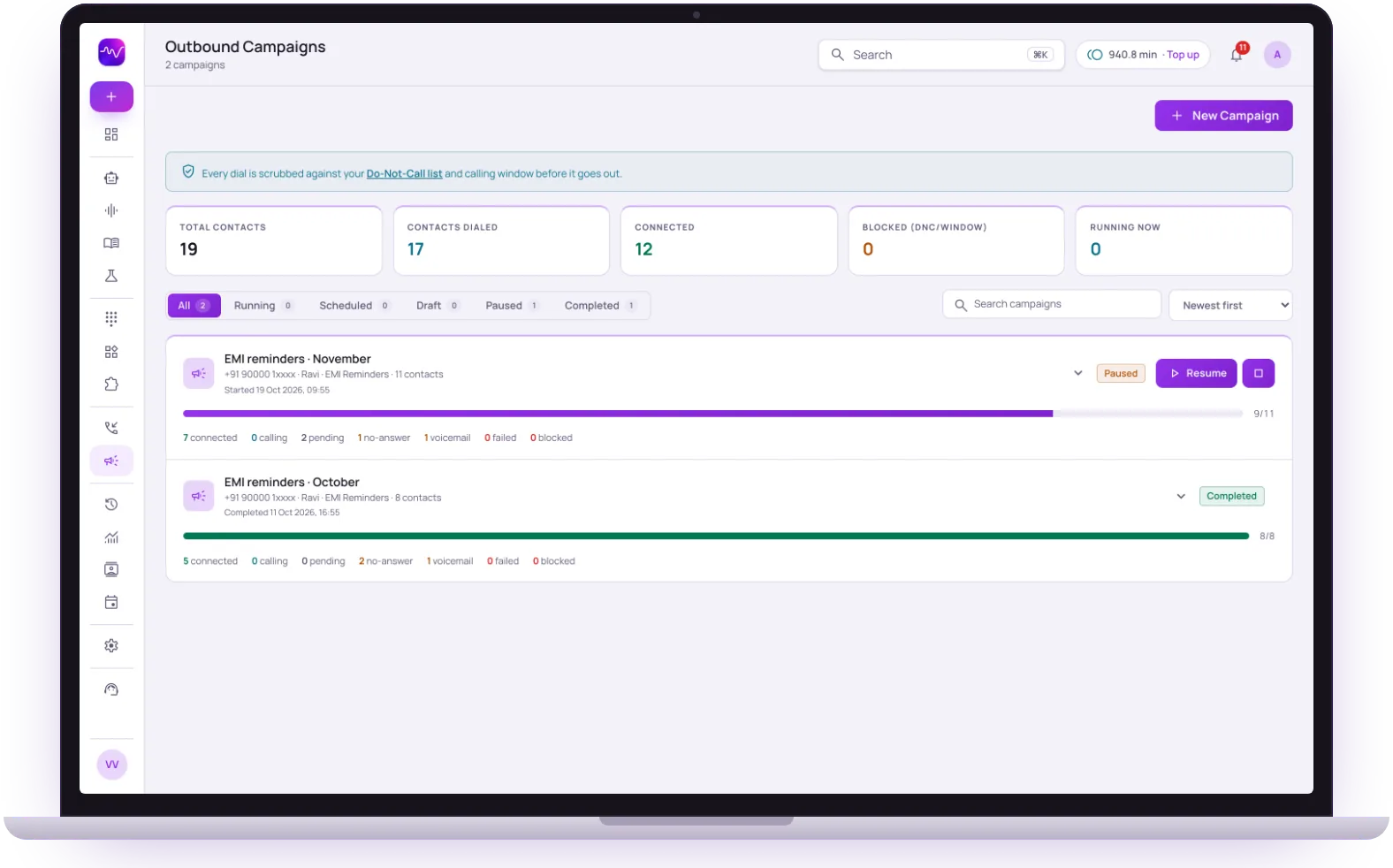 Campaign runningDo-Not-Call checked first
Do-Not-Call
Checked first
Before every dial
Calling window
Enforced
Dials outside your hours are blocked
Retries
Your rules
Attempts, gaps, busy and voicemail
Progress
Per campaign
Connected, pending, no answer, blocked

Bulk campaigns
Upload a contact list and let Artha work through it in batches you control.

Reminders & follow-ups
Appointment reminders, renewals, and nudges that never slip through the cracks.

Polite collections
Consistent, compliant reminder calls with every conversation recorded.

Live campaign metrics
Track pickup, completion, and outcome rates as the campaign runs.
Hear it on a real call before you decide.
Artha answers in your language, works on your number and your website, and leaves a record of every call.

Consent and recording, your call
Require spoken consent, switch recording on or off and set how long records are kept.

130+ languages
Hindi, Hinglish and 9 other Indian languages included. The agent follows the caller.

Phone and website
The same agent can answer your number and the call button on your site.

Every call logged
A transcript for every call, plus the lead fields captured and the audio if recording is on.
From a contact list to a finished campaign.
Outbound is the part of the platform we suggest approaching step by step: start with a small list, listen to the calls, and talk to us before scaling up.
- 1Step 1
1. Add contacts
Import a CSV, add contacts by hand, or paste one per line in international format. Numbers typed without a country code are read in your workspace’s country.
Manage contacts - 2Step 2
2. Set up the campaign
Pick the number, the agent and the audience, which can be a segment or a tag. Choose to launch on demand or schedule a start time.
Run an outbound campaign - 3Step 3
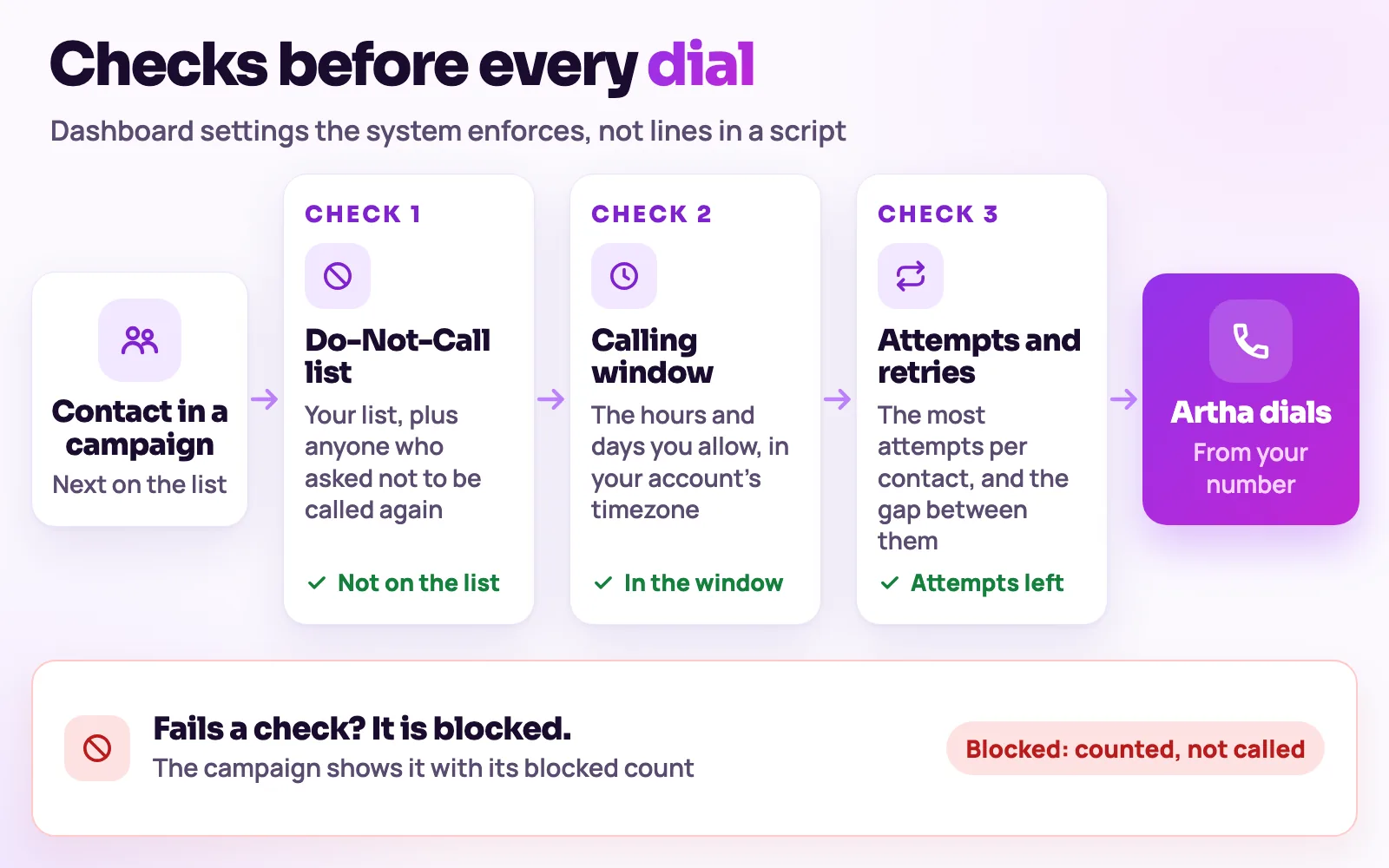
3. Compliance checks run first
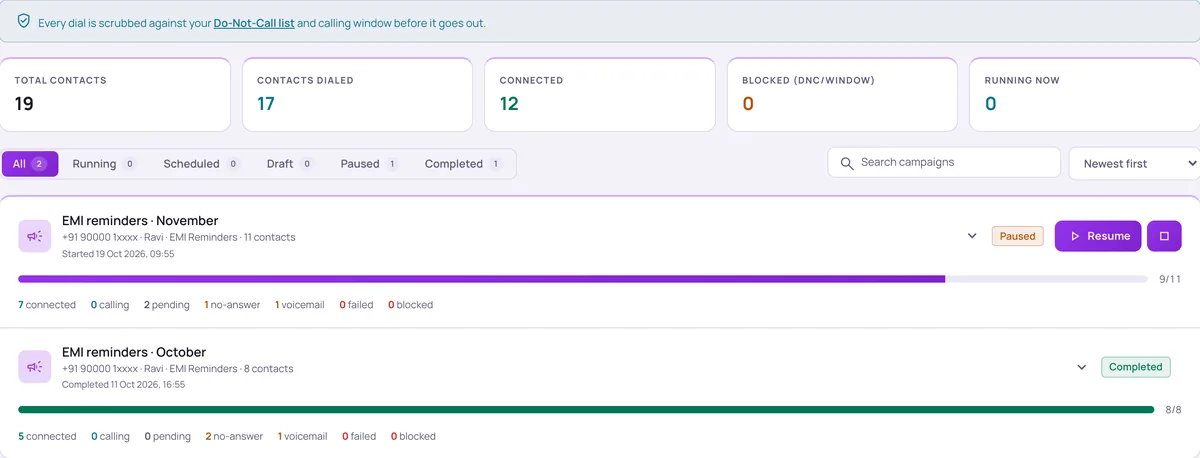
Every dial is checked against your Do-Not-Call list and calling window before it goes out. Blocked contacts are counted, not called.
Calling window and Do-Not-Call - 4Step 4
4. Watch the outcomes
Progress shows per campaign: connected, calling, pending, no answer, failed and blocked. Every call has a transcript you can open.
Pace, retries and personalisation.
Retries
Set a maximum number of attempts and a gap between them, with separate rules for busy lines and voicemail if you want them.
Concurrency and pace
Choose how many calls run at once and an optional limit on attempts per minute. The channel limit on your telephony account is the real ceiling.
Calling window
TRAI norms limit unsolicited calls to 9am to 9pm, Monday to Saturday. With the calling window enforced, dials outside your hours and days are blocked, using your account’s timezone.
Variables
Use {{name}}-style variables in the welcome message and prompt so each call carries the contact’s own details.
Do-Not-Call
Add numbers by hand or in bulk. When a caller asks not to be called again, the agent adds them itself.
Instant lead follow-up
A private webhook queues a call within about 15 to 30 seconds of a new lead arriving, still subject to your compliance rules.
How it works


Calls that are expected, not cold.
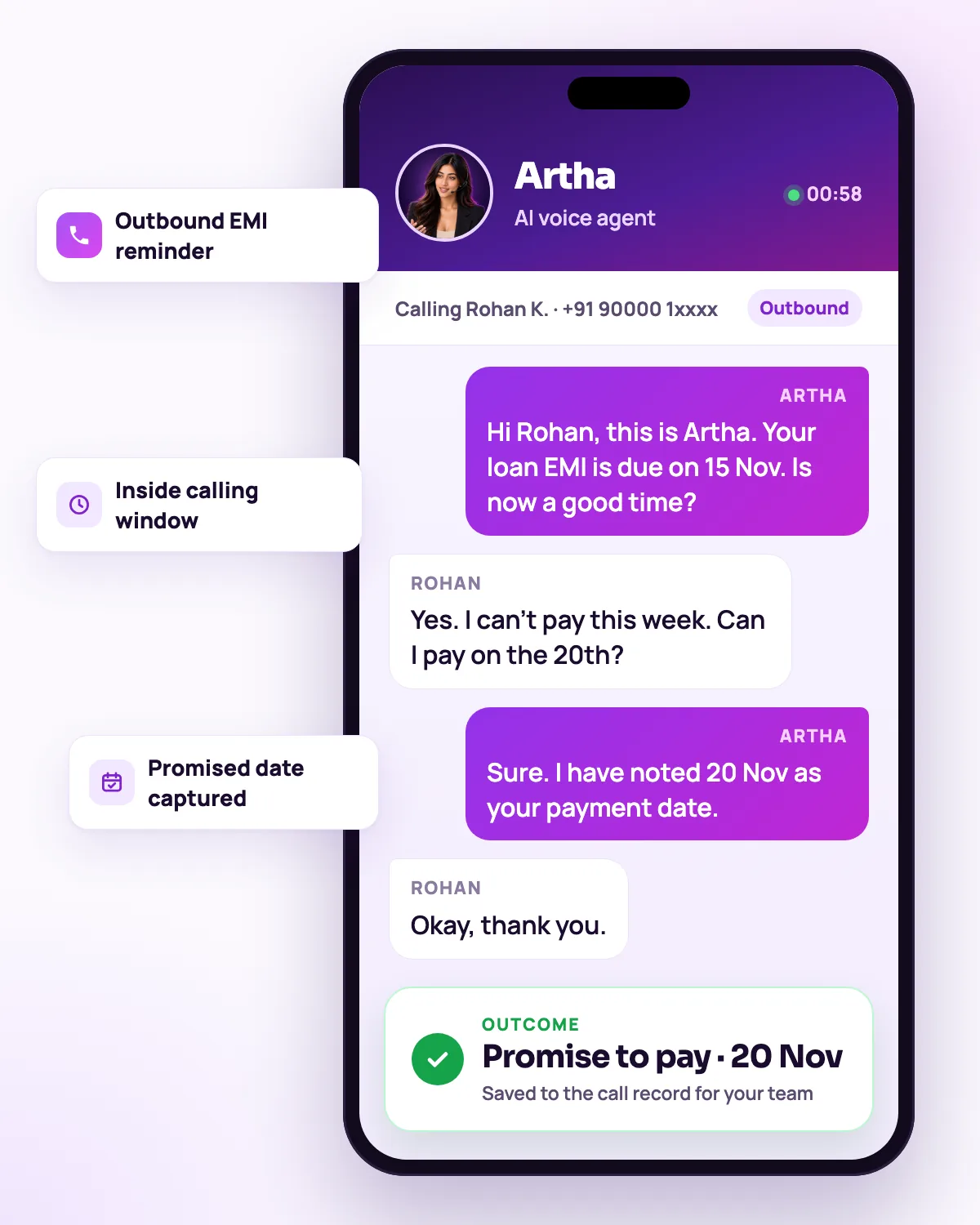
EMI and payment reminders
Polite, consistent reminders to customers who already owe a payment, with every call logged.
Finance and collectionsLead calls and callbacks
Qualify new enquiries and ring back people who asked for a later call, the routine part of a telecaller’s day.
AI telecallerInbound and outbound on one agent
The agent that runs your campaigns can also answer your business number and website calls, with the same instructions and call records.
AI calling agent


Only call people you are permitted to call. Consent and regulatory obligations remain yours; Vistrow enforces the calling window and Do-Not-Call list you configure.
The same screens your team will use.
These are views of the real Vistrow Voice dashboard, with sample data.
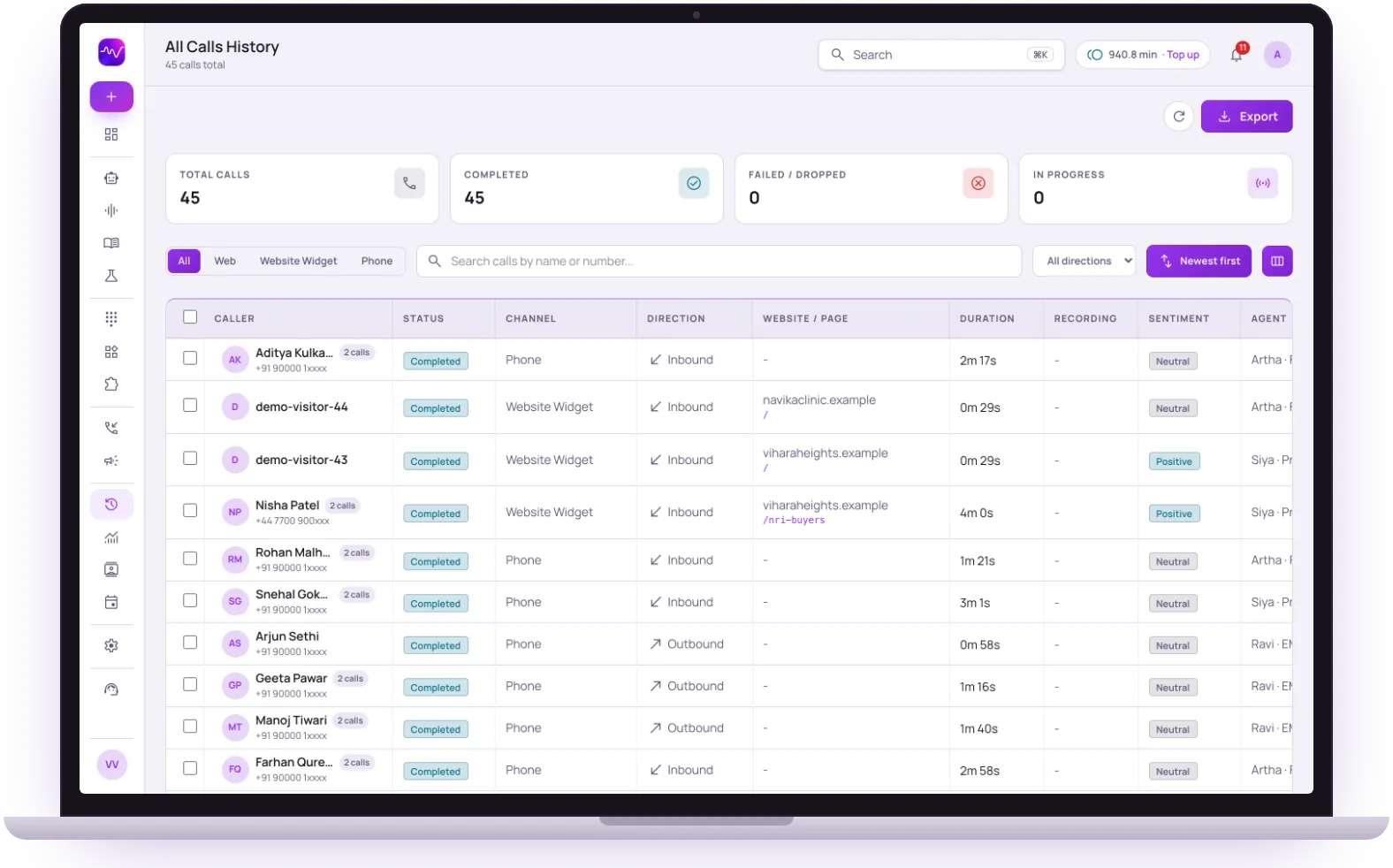
- 1
Filter by channel
Phone, web and website widget calls sit in one list, one tap apart.
- 2
Inbound and outbound together
Each row shows the direction, the duration and the page a website call came from.
- 3
Sentiment and the agent
See how each call went and which agent took it, then open the transcript.
The questions buyers ask first.

What does it cost?
Usage is measured in minutes of conversation, and the voice and model you choose change how quickly minutes are used. Telephony is billed separately by the provider you connect.
How pricing works
How much setup is it?
No code. Set the persona, prompt, voice and language, test it in the browser, then publish. Later changes apply from the next call.
Create an agent
Can a person take over?
On phone calls the agent can dial in the colleague you set and stay on until they answer. Website calls take a callback request instead.
Functions and transfer
What if it does not know?
With strict mode on, it quotes your approved answers and says it will check with the team when something is not covered, rather than guessing.
Knowledge baseStill deciding? Ask Artha yourself.
- No signup needed
- 5 free calls
- 130+ languages
Questions, answered.
The things people ask us most. If yours isn’t here, talk to us and a person will reply.
Ask us directlyThat depends on your plan and the telephony channels provisioned for your account. We recommend starting with a small list, reviewing the calls, and speaking to us before running a large one.
Yes - use {{variables}} like name or due date so every call sounds tailored, not scripted.
Yes - set a start time and the campaign launches automatically, with progress shown per campaign as it runs.
Yes. Every dial is checked against your Do-Not-Call list and, with the calling window enforced, your allowed hours and days before it goes out. Blocked contacts are counted, not called.
The contact is retried according to the maximum attempts and gap you set, with separate rules available for busy lines and voicemail.
Yes. Leads pushed from ArthaLeads, or from any source that can send a webhook, can queue a call within about 15 to 30 seconds. Your compliance rules still apply.
Put an AI agent on every call.
Try Artha live in your browser, or book a walkthrough with our team.
- No signup needed
- 5 free calls
- 130+ languages