
भारत के लिए/Built for BHARAT
A front desk that never sleeps.
Artha books appointments, answers common patient questions, and triages calls - freeing your staff for in-person care.
130+
Languages
24/7
Answering
3
Channels
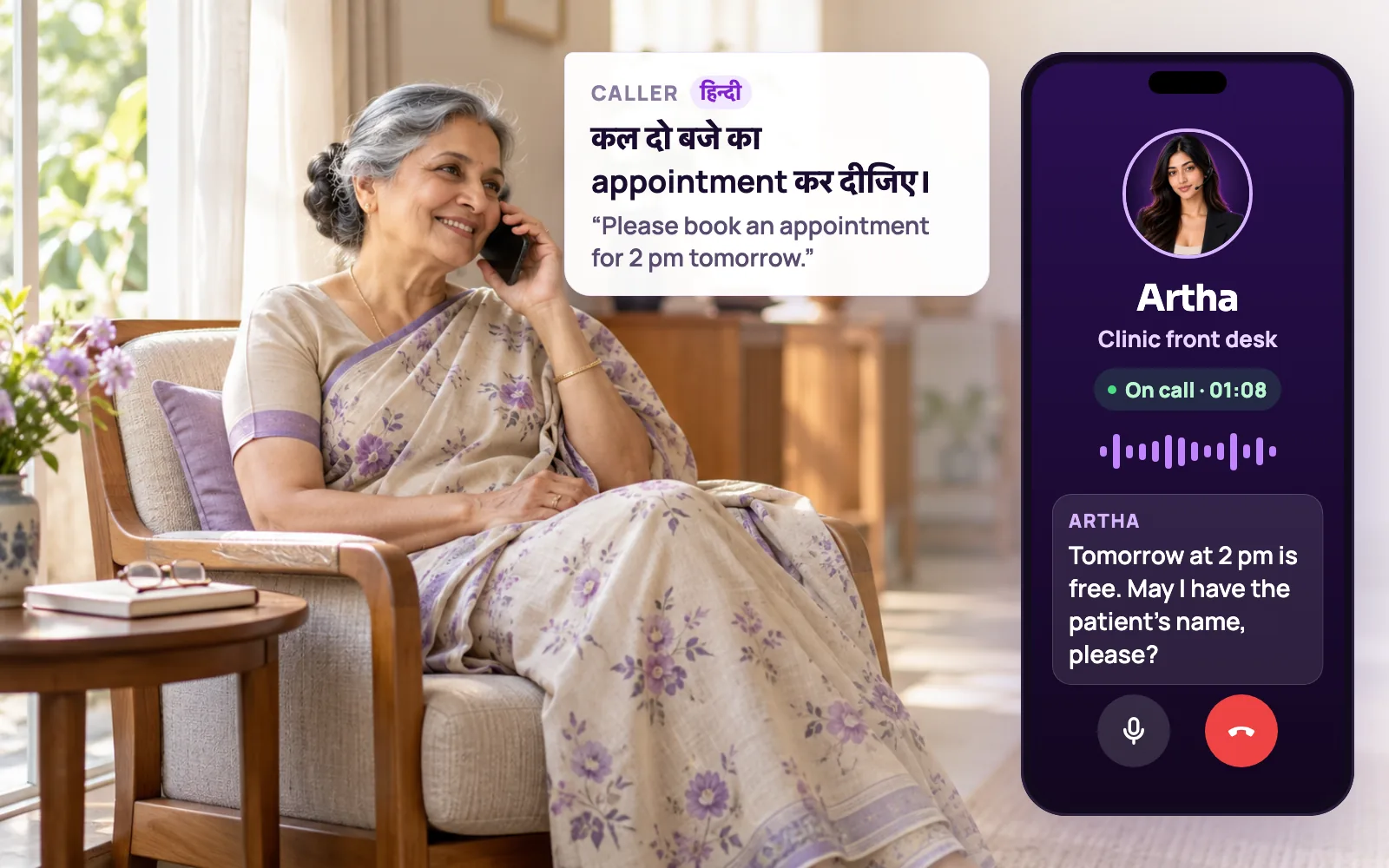
Test it on a call your team takes today.
Pick a situation your team handles today, then say the sample line or use your own words.

What Artha does
Acknowledges the concern, checks whether it sounds urgent and routes to the relevant clinic service without diagnosing.

Useful outcome
Appropriate next step with safety kept ahead of scheduling.
Where the current workflow breaks.

Overloaded reception
Staff can’t answer every call during clinic hours. Artha handles the overflow.

No-shows
Automated reminder calls cut no-shows and keep the schedule full.

Repetitive FAQs
Timings, location, prep instructions - answered instantly, grounded in your info.
Hear it on a real call before you decide.
Artha answers in your language, works on your number and your website, and leaves a record of every call.

Consent and recording, your call
Require spoken consent, switch recording on or off and set how long records are kept.

130+ languages
Hindi, Hinglish and 9 other Indian languages included. The agent follows the caller.

Phone and website
The same agent can answer your number and the call button on your site.

Every call logged
A transcript for every call, plus the lead fields captured and the audio if recording is on.
How the conversation becomes an outcome.
- 1Step 1
1. Listen to the concern
Capture the reason for calling before suggesting a doctor or appointment.
- 2Step 2
2. Check urgency safely
Recognize possible warning signs and direct urgent cases to immediate human care.
- 3Step 3
3. Route to relevant care
Use verified clinic services and avoid diagnosis or unrelated specialties.
- 4Step 4
4. Confirm the appointment
Check live slots, collect patient details and save a real booking.
Enquiries, bookings and callbacks, in the caller’s language.
This is administrative front-desk work only. The agent never gives medical advice, and the clinic team stays in charge of everything clinical.
Clinic information
Timings, location, doctors, services and how to prepare for a visit, answered from the knowledge base you upload. With strict mode on, it quotes your approved answers and says it will check with the team when something is not covered.

Appointment requests
It collects the patient’s name, phone number and reason for the visit, offers free slots inside your business hours, and confirms only once the booking has saved. Bookings appear in Appointments, where staff can reschedule them or mark them confirmed, completed, cancelled or no-show.

Callbacks when no slot fits
If nothing suits the caller, it records a callback request with their preferred day and time, so the call does not end without a next step.

A person when it matters
Set a transfer phone number and the agent can dial a colleague into the call and stay on until they answer. Worrying symptoms are directed to immediate human or emergency care, not handled by the agent.
Hindi, regional languages and English
Callers can speak Hindi, Marathi, Tamil, Kannada, Telugu and the other supported Indian languages, plus English, and the agent follows when they switch mid-call.

Returning patients
Turn on Memory and the agent keeps a short summary of earlier calls from the same number, so a returning caller is greeted accordingly.
Reminder calls run as an outbound campaign.
There is no automatic reminder attached to every booking. You choose who to call and when, and the campaign does the dialling.

1. Choose the contacts
Import a CSV or add contacts by hand, then pick them or a segment when you create a campaign under Outbound.

2. Personalise the call
Use {{variables}} such as the patient’s name or the appointment date in the agent’s prompt and greeting, with fallback values for blanks.

3. Calling rules apply
Every dial is checked against your Do-Not-Call list and calling window first. Blocked contacts are counted, not called.
4. Staff update the record
Read the outcome in the call details, then reschedule or cancel in Appointments. The agent can also take a callback request if the patient asks to move the visit.
Your hours, your information, your rules.

Bookable hours
Business hours per day, slot length from 15 to 60 minutes, timezone and blackout dates, set under Settings, Scheduling.

Clinic knowledge
Upload the fee sheet, doctor list or visit instructions, review the extracted question and answer pairs, then attach the knowledge base to the agent.

Post-call details
Pick the fields pulled from every transcript, such as the visit reason, and send each call to your team through a webhook, Slack, Google Sheets or your CRM.

Consent, recording and retention
Switch on spoken consent so the agent asks before details are collected, choose whether calls are recorded, and set how long records are kept.
Whether and how to record patient calls, and what patients are told, is the clinic’s responsibility; Vistrow Voice provides the controls above. The security page lists what is in place today and what is not, and we make no medical-compliance or certification claims.
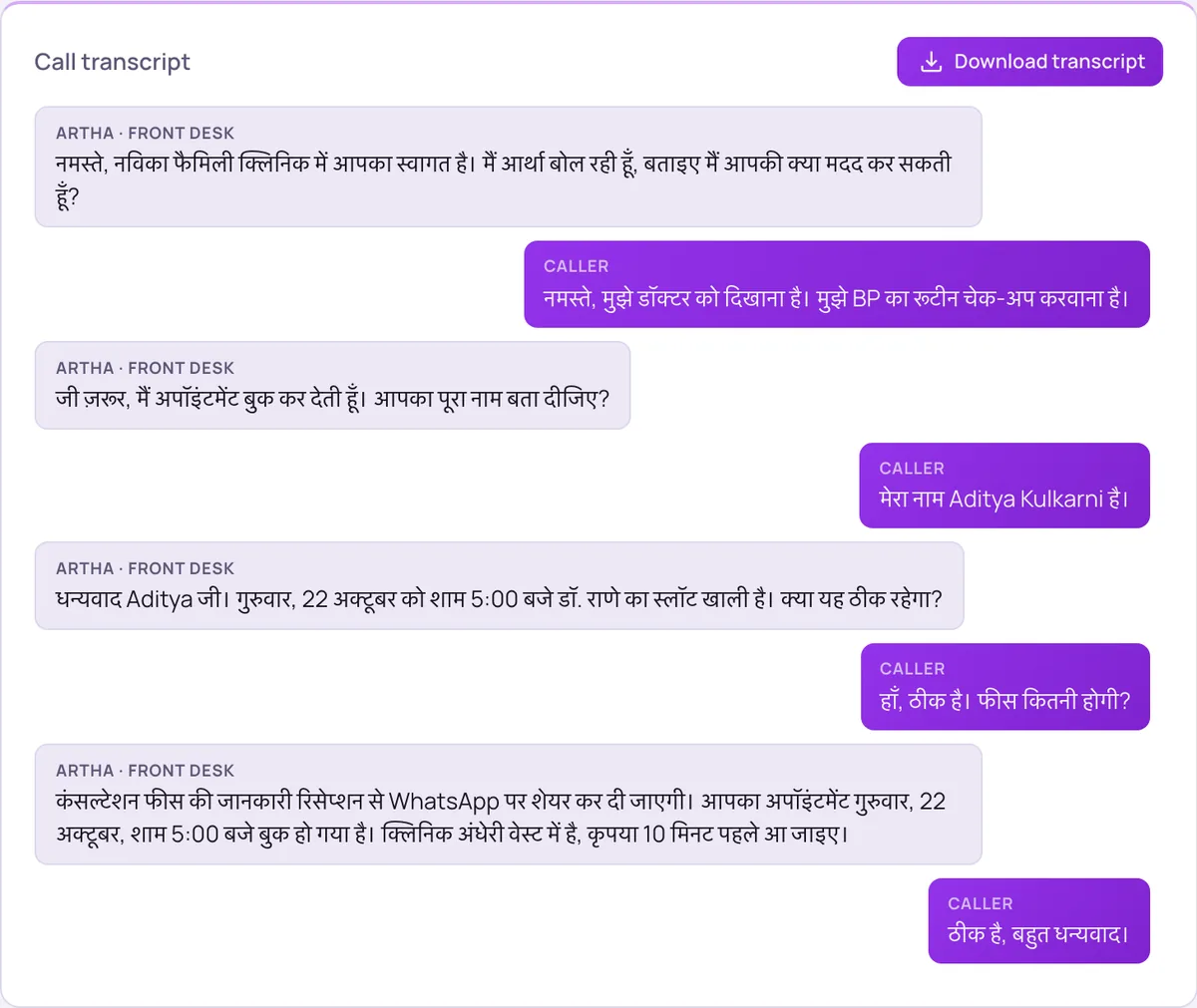
Clinic call summary
Example only. Your agent captures the fields and outcomes configured for your workflow.
No manual call reconstruction.
- Appointment booking
- Reminder calls
- FAQ answering
- Call triage
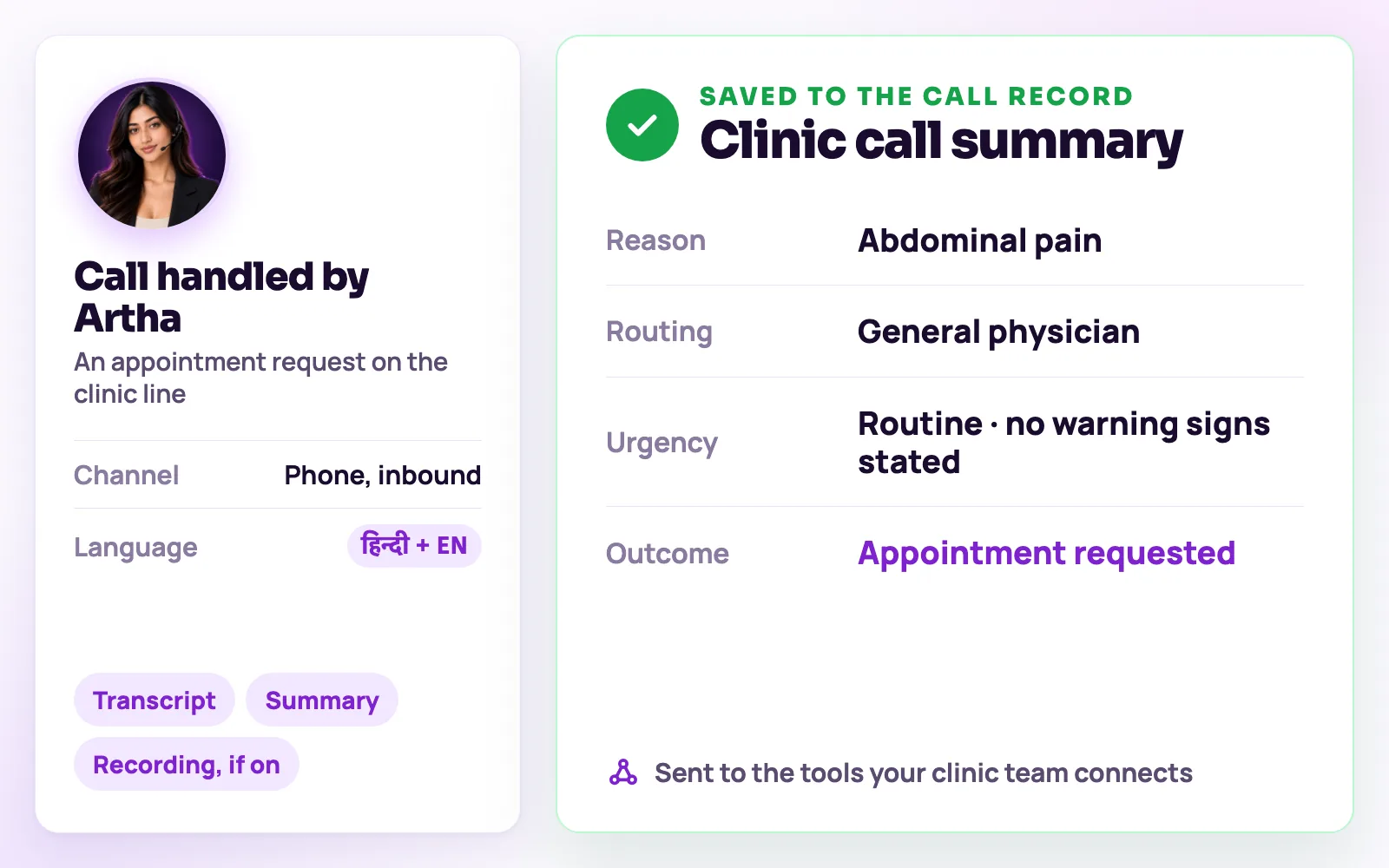
The same screens your team will use.
These are views of the real Vistrow Voice dashboard, with sample data.
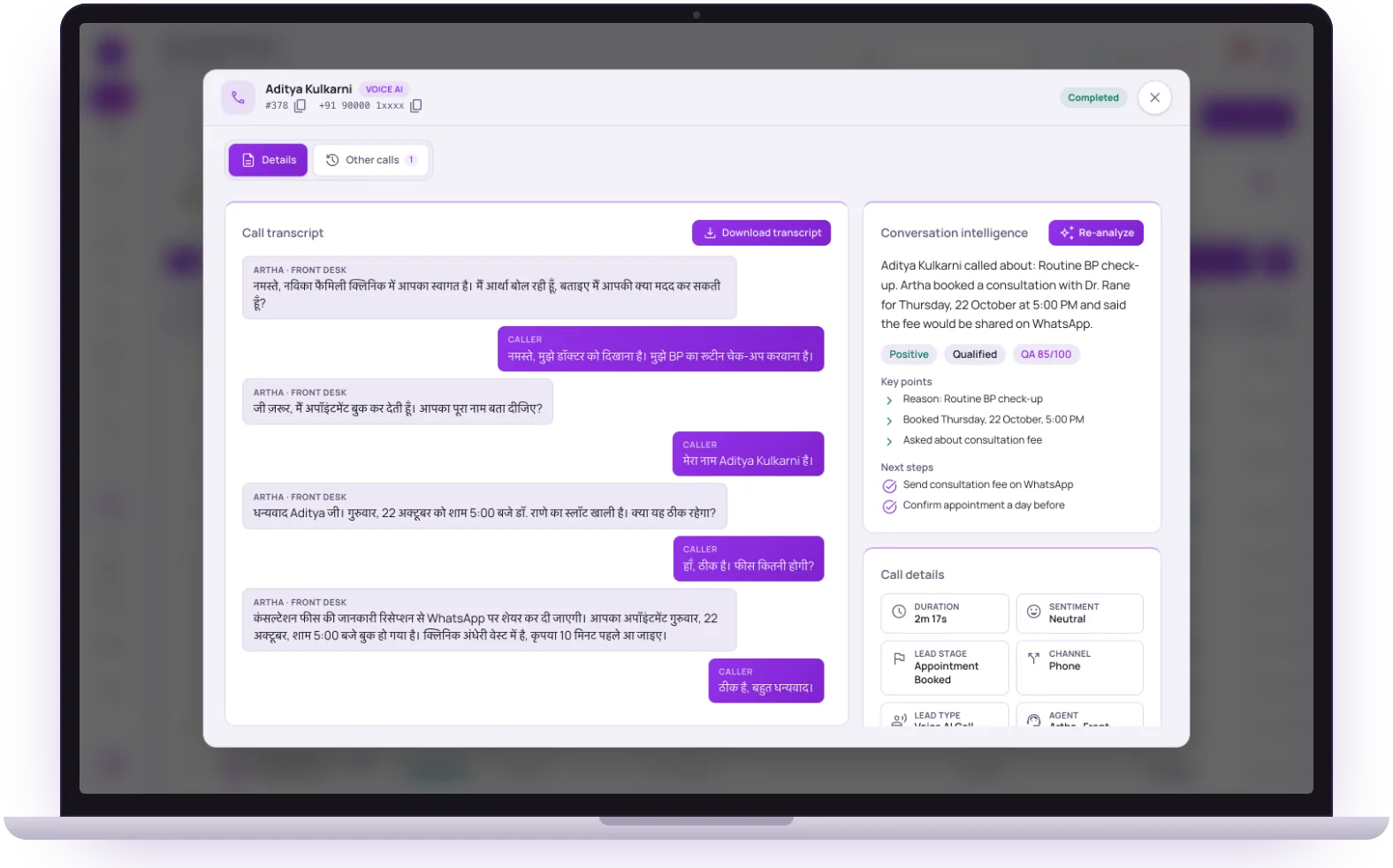
- 1
The full transcript
Download it, or let it travel with the lead to your tools.
- 2
Summary and next steps
Why they called, what was agreed and what your team should do next.
- 3
Lead stage and channel
The fields the agent captured are saved with the call and sent on.
The call should update the tools your team already uses.

Clinic calendar
Check live appointment availability and stop double bookings.

Reminder calls
Call patients before scheduled visits and capture confirmations.

Clinic CRM
Send patient-provided contact and visit context to the clinic team.
What Artha must never improvise.
Useful automation is grounded, auditable and honest about when a person needs to take over.

Artha does not diagnose, prescribe medication or promise a clinical outcome.
Possible emergencies are directed to immediate local emergency or human care.
A booking needs a real patient name, phone number, visit reason and successful calendar response.
The questions buyers ask first.

What does it cost?
Usage is measured in minutes of conversation, and the voice and model you choose change how quickly minutes are used. Telephony is billed separately by the provider you connect.
How pricing works
How much setup is it?
No code. Set the persona, prompt, voice and language, test it in the browser, then publish. Later changes apply from the next call.
Create an agentCan a person take over?
On phone calls the agent can dial in the colleague you set and stay on until they answer. Website calls take a callback request instead.
Functions and transfer
What if it does not know?
With strict mode on, it quotes your approved answers and says it will check with the team when something is not covered, rather than guessing.
Knowledge baseStill deciding? Ask Artha yourself.
- No signup needed
- 5 free calls
- 130+ languages
Questions, answered.
The things people ask us most. If yours isn’t here, talk to us and a person will reply.
Ask us directlyYes, as an outbound campaign. Pick the patients to call, personalise the greeting with their name or appointment date, and the agent dials within your calling window and Do-Not-Call rules. Reminders are not attached to every booking automatically.
Yes - call data is tenant-isolated to your clinic account and only accessible to your team.
Yes - build a separate agent per location, or one agent that routes based on what the caller needs.
No. It answers administrative questions from the information you provide, does not diagnose or suggest treatment, and directs possible emergencies to immediate human or emergency care.
Agents book into the Appointments calendar built into Vistrow Voice. To pass bookings to another system, send the appointment-booked event to a webhook, Slack, Google Sheets or your CRM. There is no connector for a specific hospital system.
Yes. Hindi, including everyday Hinglish, Marathi, Gujarati, Kannada, Telugu, Tamil and the other supported Indian languages, plus English.
Recording and spoken consent are settings on the Compliance page, so you decide. With consent required, the agent asks first and discards the recording if the caller declines. Your clinic decides what it records and tells patients.
Yes. Call the clinic demo above to hear a made-up clinic answered live, then use the Testing Lab on your own agent to run scenarios before any real patient calls.
Ready to try Artha for Healthcare & Clinics?
Try Artha live in your browser, or book a walkthrough with our team.
- No signup needed
- 5 free calls
- 130+ languages