
Every lead, in the tools you already use.
The moment a call qualifies a lead, Vistrow Voice pushes it - with the full transcript and outcome - wherever your team works.
- No signup needed
- 5 free calls
- 130+ languages
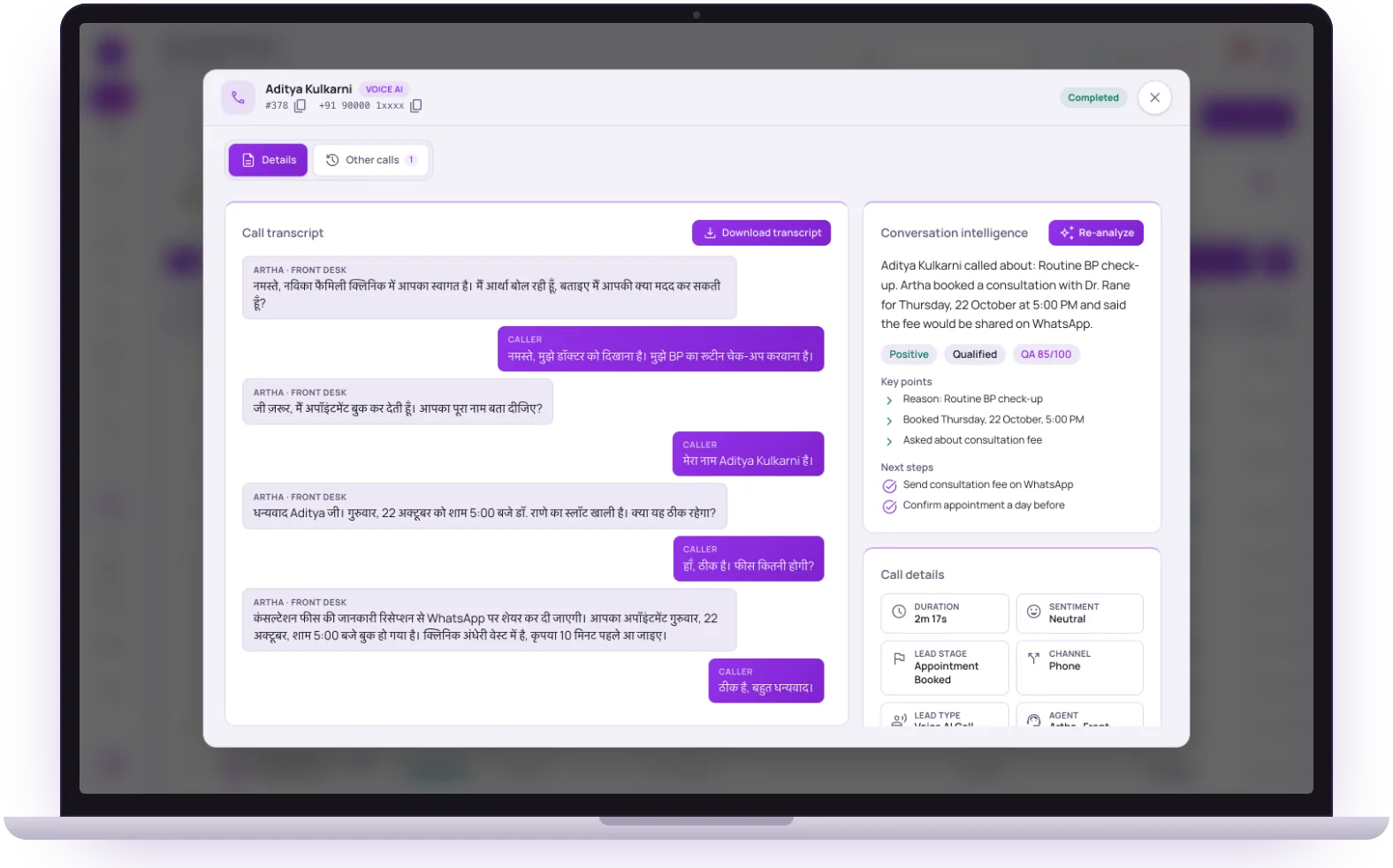 Call completedLead delivered
Send qualified Vistrow Voice leads into Slack.
Connect once, choose a channel, and every qualified lead lands in Slack with the caller details, source, language, agent, outcome, summary, and transcript context your team needs for fast follow-up.
How to install
- 1. In Vistrow Voice, open Dashboard → Integrations.
- 2. Click Connect Slack and pick the workspace/channel.
- 3. Use Test Slack to confirm your lead alert lands.
CRM
ArthaLeads CRM
NativeNative connector. Every qualified lead, with the full transcript, pushed on call end - paste a connection key, no URL setup.
CRM
Zoho CRM
NativeNative connector. Connect with Zoho and each caller who leaves a phone or email becomes a lead in your Leads module; repeat callers update their lead.
Notifications
Slack
NativeNative connector. Choose a Slack channel once, then receive every qualified lead with the transcript.
Reporting
Google Sheets
NativeNative connector. Sign in with Google and every caller who leaves a phone or email becomes a row in a leads sheet created in your Drive.
Developer
CRM / Webhook
NativeNative connector. Post every call event as JSON to any URL you control, with an optional token.
Automation
Zapier
Via webhookPoint the lead webhook at a Zapier catch hook to pass calls on to the apps Zapier connects to.
Automation
n8n
Via webhookSelf-hosted automation - same JSON payload, your own infrastructure.
Automation
Make
Via webhookRoute call outcomes into Make scenarios for multi-step workflows.
CRM
Salesforce, HubSpot and others
Via webhookAny CRM that accepts an inbound webhook - or use the full API for a deeper two-way sync.
From the end of a call to a record in your tools.
- 1Step 1
1. Connect from the dashboard
Open Integrations, click Connect on a card and follow the steps: sign in with Google or Zoho, pick a Slack channel, or paste a URL or key.
Send leads to your CRM and tools - 2Step 2
2. Send a test
Use Send test where offered. A sheet gets a row marked as a test, Zoho gets a test lead, Slack gets a sample lead, and a webhook receives a sample payload.
- 3Step 3
3. A call finishes
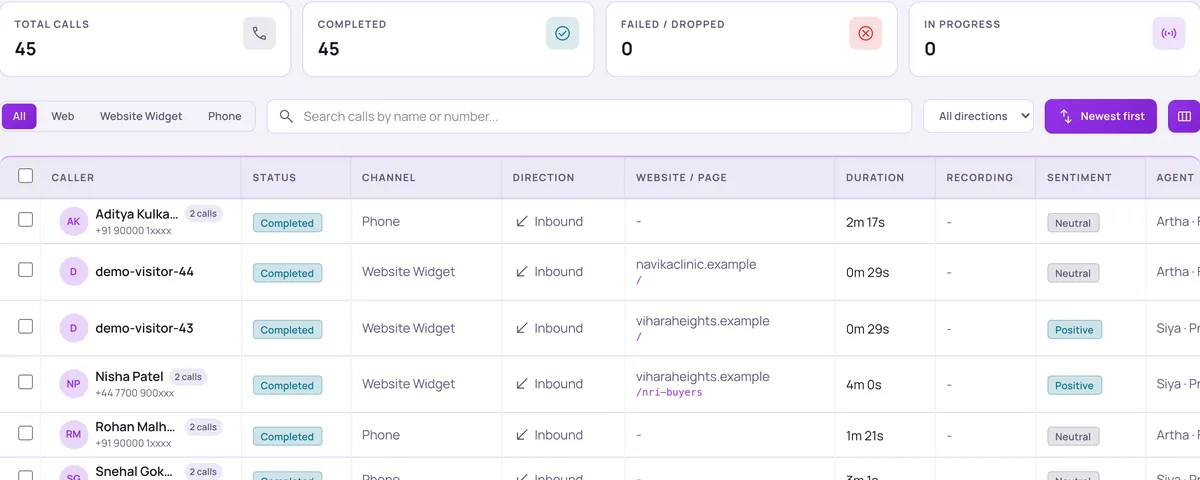
Every connected integration receives the lead, with the transcript and the fields the agent captured. Callers who left no phone number or email are skipped on purpose.
- 4Step 4
4. Check delivery
Each card shows its status, last sync and any error, and an Activity tab lists recent deliveries. If a destination was down, re-send from the call’s details.
Find a call
Five connections you can set up today.
Each card on this page is a real connection in the dashboard. Others are reached through the generic webhook, and labelled that way above.
ArthaLeads CRM
Paste the connection key from ArthaLeads. One complete record per call arrives when the call ends, with transcript and recording. It needs a name and a phone number, and you can also choose which new ArthaLeads leads your agents should call.
Zoho CRM
Connect with a Zoho CRM admin account and approve access to Leads. Each caller who leaves a phone or email becomes a lead, matched on phone first and then email, so a repeat caller updates their existing lead.
Google Sheets
Sign in with Google and a sheet called Vistrow Voice, Leads is created in your Drive, one tab per agent. Access is limited to files Vistrow Voice created, not the rest of your Drive. You can hide columns such as the recording.
Slack
Click Connect Slack, choose the channel, and lead alerts post there. You choose which events post and which fields are included.
Instant lead follow-up
Push new leads from ArthaLeads, or post them from any source to your Instant Lead Follow-up URL. Each lead is added to Contacts and called by your instant follow-up campaign, within your calling window and Do-Not-Call rules.
Instant lead follow-upCRM or webhook
Paste any URL that accepts a JSON POST. An optional token is sent in the body. The receiver has about five seconds to answer, so respond quickly and do heavy work afterwards.


Hear it on a real call before you decide.
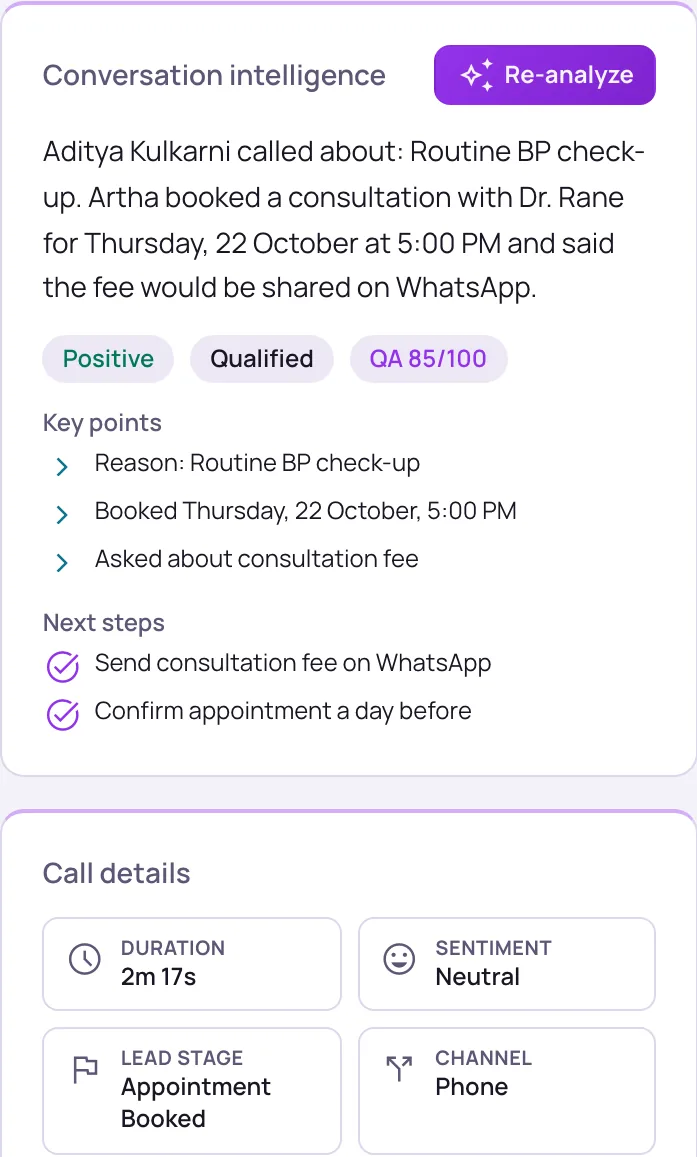
Artha answers in your language, works on your number and your website, and leaves a record of every call.

Consent and recording, your call
Require spoken consent, switch recording on or off and set how long records are kept.

130+ languages
Hindi, Hinglish and 9 other Indian languages included. The agent follows the caller.

Phone and website
The same agent can answer your number and the call button on your site.

Every call logged
A transcript for every call, plus the lead fields captured and the audio if recording is on.
You choose the events and the fields.
Webhook, Slack and a sheet connected by Apps Script URL can send up to four events. Zoho, ArthaLeads and the Sign in with Google sheet always send one record per caller at the end of the call.

End of call
One record when the call ends, with the summary, details and recording link.

Lead details during the call
Each time the agent saves new details, such as name, need or budget, while the caller is still on the line.

Appointment booked
When the agent books a slot in the Appointments calendar built into Vistrow Voice. There is no separate Google Calendar connection.

Callback requested
When the caller asks to be called back later.

Fields you can leave out
For webhook, Slack and Sheets you can drop name, phone, email, company, channel, agent, language, call length, details, transcript, page, recording or call ID. At least one of name, phone or email stays so each lead can be identified.

Per-agent routing
By default an agent delivers to every connected integration. Limit one agent to specific ones, or give it its own webhook URL for its lead, appointment and callback events.
Integrations that deliver leads automatically depend on your plan. The pricing page lists what each plan includes.
Which connection fits your team.

Sales teams in a CRM
Use Zoho CRM or ArthaLeads for a direct connection, or the webhook for any other CRM. Leads arrive with the transcript, so the advisor reads the call before dialling.

Support and operations
Post escalations to Slack, log calls in a sheet, or send each call to a helpdesk that accepts a webhook, directly or through an automation tool.

Developers
Pull agents, calls, contacts and analytics through the API on your own schedule rather than waiting for pushes.
Your own endpoint, or the API.
Don’t see your tool?
Anything that accepts an inbound HTTP request works. Point the lead webhook at your endpoint and you’ll receive a structured JSON payload on every completed call - contact details, captured fields, sentiment, duration, channel, and the full transcript.
Or build on the API
For two-way sync and custom workflows, the API exposes agents, calls, contacts, and analytics directly - so you can pull data on your own schedule instead of only receiving pushes.
Read the docsThe questions buyers ask first.

What does it cost?
Usage is measured in minutes of conversation, and the voice and model you choose change how quickly minutes are used. Telephony is billed separately by the provider you connect.
How pricing works
How much setup is it?
No code. Set the persona, prompt, voice and language, test it in the browser, then publish. Later changes apply from the next call.
Create an agent
Can a person take over?
On phone calls the agent can dial in the colleague you set and stay on until they answer. Website calls take a callback request instead.
Functions and transfer
What if it does not know?
With strict mode on, it quotes your approved answers and says it will check with the team when something is not covered, rather than guessing.
Knowledge baseStill deciding? Ask Artha yourself.
- No signup needed
- 5 free calls
- 130+ languages
Questions, answered.
The things people ask us most. If yours isn’t here, talk to us and a person will reply.
Ask us directlyArthaLeads CRM, Zoho CRM, Slack, Google Sheets and a generic webhook. Zapier, n8n, Make, Salesforce and HubSpot are reached through that webhook or the API.
No. Agents book appointments in the calendar built into Vistrow Voice, using the hours, slot length and blackout dates you set. To pass a booking elsewhere, send the appointment-booked event to a webhook.
No. The connection is limited to files Vistrow Voice creates, which is the one leads sheet, not your other spreadsheets or documents.
Yes for webhook, Slack and Sheets. Leave out any field except that at least one of name, phone or email must stay.
The failure shows on the integration card and the dashboard flags it. You get an email too if you enabled that in your preferences. Re-send the delivery from the call’s details once it is fixed.
Not for Slack, Sheets, Zoho or ArthaLeads, which are sign-in or paste-a-key setups. A webhook needs an endpoint that accepts JSON, which a developer or an automation tool can provide.
Put an AI agent on every call.
Try Artha live in your browser, or book a walkthrough with our team.
- No signup needed
- 5 free calls
- 130+ languages