Vistrow Voice
After hours answering service

An after hours answering service that does more than take a message.

Vistrow Voice answers when your office is closed, answers common questions, books the first free slot or takes a callback request, sends urgent calls to the person on call, and leaves your team a summary for the morning.

  • No signup needed
  • Free to try
  • 130+ languages
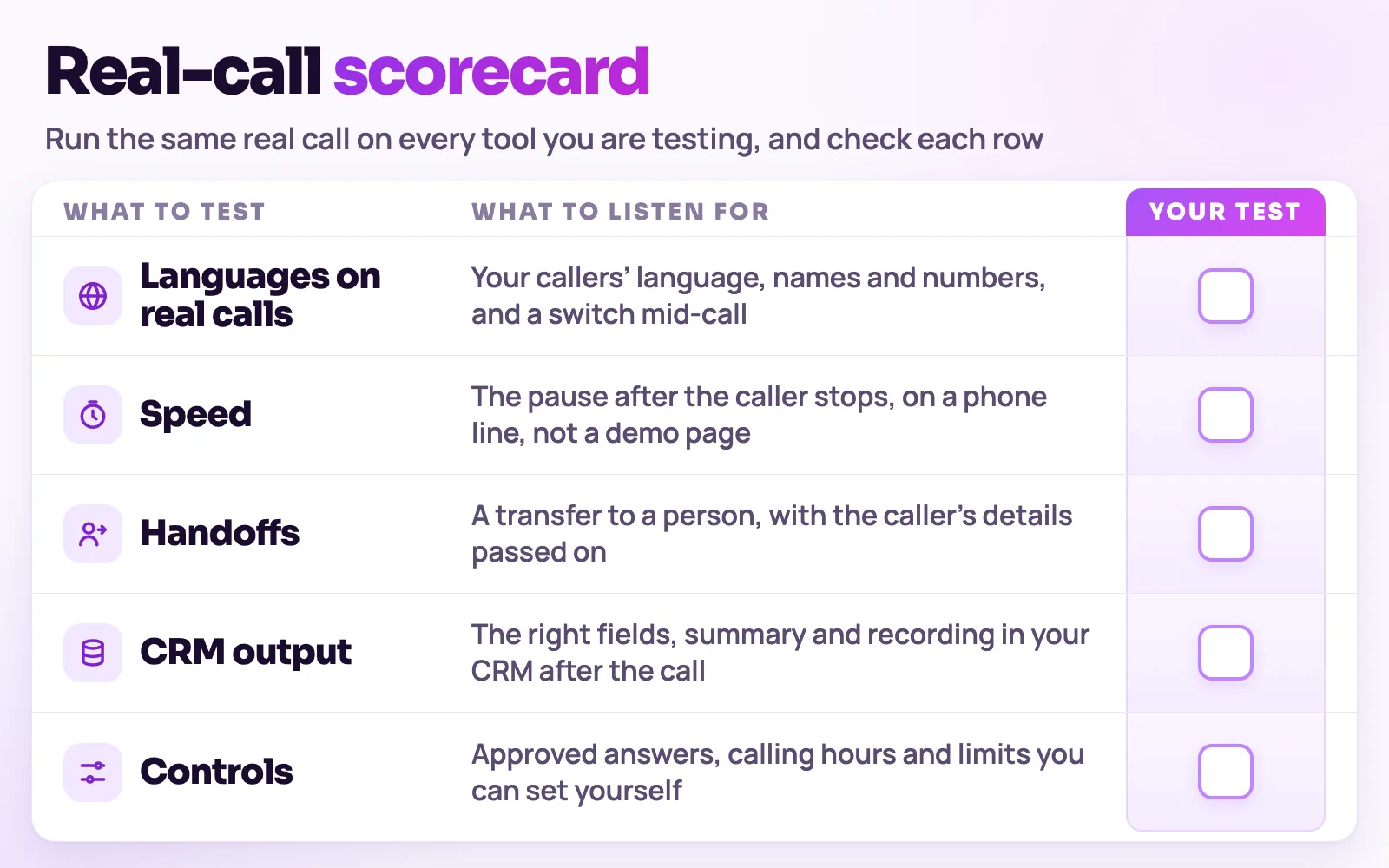
Blank scorecard for testing voice AI tools on the same real call: languages, speed, handoffs, CRM output and controls
Run the same real call on each tool you test and tick each row yourself.
What to check

The parts of the decision, one at a time.

01

What callers need when you are closed

A caller at 9 pm usually wants one of four things, and a good after hours service handles each differently.

  • A quick answer, such as opening hours or whether you can help with a problem
  • A booking, so the request is not lost until morning
  • A callback at a time that suits them, with the right number
  • A person right now, because the problem cannot wait
02

How urgent calls reach the person on call

You decide what counts as urgent and who takes it. The agent asks the questions you write, then dials the transfer number you set and stays on the line until your colleague answers.

  • Write the urgent cases in plain words, for example a burst pipe, a gas smell or severe pain
  • Set one transfer number, such as the on-call mobile
  • Phone calls can be transferred; a website call takes a callback number instead
  • Everything else is booked or logged for the morning
03

What your team sees in the morning

Every after hours call is in Calls history with a transcript, a summary and the details captured. Records can also go to your CRM, spreadsheet, Slack or a webhook as the call ends.

  • Callback requests with the caller’s name, number and preferred time
  • Booked appointments in the Appointments calendar
  • Urgent calls that were transferred, and what was said before the handover
04

Setting the hours

Leave the call window on the number’s route blank and the agent answers at any time. If you set a window or active days, calls outside them are not answered by the agent, so choose the setting that matches how you want to cover the phone.

  • Agent only at night, people in the day
  • Agent as overflow when every line is busy
  • Agent all day, with a person for transfers
Decision rule

The test is what happens at 11 pm.

Judge an after hours service by what the caller gets: an answer, a booking, a callback or a person. A message alone is the minimum, not the goal.

  • Transport and listening
  • Thinking and speaking
  • Recordings and transcripts
  • Analytics and CRM delivery
Know the categories

Four ways to cover calls out of hours.

Compare what the caller actually gets, not only what each service is called.

01

Voicemail

Fits when: Low volume, where a next-day callback is fine.

Trade-off: Callers who need help tonight hang up, and every message is more work in the morning.

02

Live answering service

Fits when: Businesses that want a human to take every night call.

Trade-off: Operators follow a script and usually take a message or forward the call.

03

AI after hours answering

Fits when: Routine night calls: questions, bookings, callbacks and urgent routing.

Trade-off: Needs approved information and a clear on-call route for emergencies.

04

Mixed: AI first, person for urgent

Fits when: Trades, clinics and property firms with a real on-call rota.

Trade-off: Needs a short test to agree what counts as urgent.

Selection checklist

Test any after hours service on these points.

Test any after hours service on these points.
CriterionWhat good looks likeHow to test it
01PickupEvery call is answered at the hours you set, including weekends and holidays.Ring at 11 pm on a Sunday.
02Urgent routingUrgent calls reach the person on call without the caller repeating themselves.Describe an emergency and time the handover.
03Routine callsQuestions are answered, or a booking or callback is recorded.Ask for hours, then a booking, then a callback.
04Message qualityThe record has a name, a number that works, the reason and the preferred time.Check a test record against what you said.
05Morning handoverYour team sees summaries without replaying audio.Open the call list the next morning and see how long review takes.
06DisclosureThe opening line says the caller is speaking with an AI assistant where your rules expect it.Read the greeting aloud and agree it with whoever handles compliance.
This is a selection guide, not a ranking. Test every option, including Vistrow Voice, on your own calls before you decide.
Run a fair trial

Pilot night cover in five steps.

  1. Step 1: Write what counts as urgent and name the person on call and their number.
  2. Step 2: Add your opening hours, services and policies to the knowledge base.
  3. Step 3: Route calls to the agent from closing time to opening time on one line.
  4. Step 4: Make test calls at night, including an urgent one and one that needs a booking.
  5. Step 5: Review the morning summaries for a week and adjust the urgent list and answers.
Before you decide

The questions buyers ask first.

What does it cost?

Usage is measured in minutes of conversation, and the voice and model you choose change how quickly minutes are used. Telephony is billed separately by the provider you connect.

How pricing works

How much setup is it?

No code. Set the persona, prompt, voice and language, test it in the browser, then publish. Later changes apply from the next call.

Create an agent

Can a person take over?

On phone calls the agent can dial in the colleague you set and stay on until they answer. Website calls take a callback request instead.

Functions and transfer

What if it does not know?

With strict mode on, it quotes your approved answers and says it will check with the team when something is not covered, rather than guessing.

Knowledge base

Still deciding? Ask Artha yourself.

  • No signup needed
  • Free to try
  • 130+ languages
FAQ

Questions, answered.

The things people ask us most. If yours isn’t here, talk to us and a person will reply.

Ask us directly

It is a service that answers your business calls when your office is closed. A live service uses human operators who take messages or forward calls. An AI service uses a voice agent that can also answer questions, book appointments and route urgent calls.

Yes, on phone calls. You describe what counts as urgent and set a transfer number. The agent dials your colleague in and stays on until they answer. Website calls take a callback number instead.

It answers whenever the route allows. With the call window left blank it picks up at any time. If you set a window or active days, calls outside them are not answered by the agent.

Each call is saved with a transcript, a summary and the details captured, and booked appointments appear in the Appointments calendar. Records can also be sent to your CRM, Google Sheets, Slack or a webhook.

Yes. Open each call by saying the caller is speaking with an AI assistant and that the call may be recorded, then offer a person where you can. Check your local rules with whoever handles compliance.

Live demo

Put an AI agent on every call.

Try Artha live in your browser, or book a walkthrough with our team.

  • No signup needed
  • Free to try
  • 130+ languages

Related guides

For a closer look at the caller who rings at 11 pm, read our guide to after-hours AI answering.